
Free Hazard Report Form Template
Free Word hazard report form for Queensland workplaces: report a hazard, rate the risk, record the controls agreed and sign it off, with tick boxes and date pickers.
RG
Written by Ryan Graham, health and safety professional (16 years on Queensland sites)
Free
No payment needed · instant download
- Instant download · it appears as soon as you send the form
- Make it yours in minutes · edit in Microsoft Word and add your logo
- If it has a fault · tell us and we'll fix it
- No card needed · free to download, with no payment details asked for
About this template
This free hazard report form is an editable Microsoft Word form for Queensland workplaces. A hazard report form is how a worker tells their supervisor about something that could hurt someone, before anyone is hurt. The worker records what they saw and what they did straight away; the supervisor rates the risk, agrees the controls and signs it off once the hazard is fixed.
A free Word form that lets anyone in your workplace report a hazard as soon as they see it. The supervisor or manager then rates the risk, records the controls agreed using the hierarchy of controls, and signs it off once the hazard is controlled.
Use it with our Free Hazard Register, Hazard Management Policy.
Why hazard reporting matters
Every serious incident starts as a hazard someone could have reported. Queensland’s Work Health and Safety Act 2011 expects you to identify hazards and assess risks in consultation with your workers (section 49), and directors and other officers must make sure the business has processes for receiving information about hazards and responding to it in a timely way (section 27). Workers must take reasonable care and co-operate with your reasonable safety procedures (section 28), so a simple, well-known hazard report form gives everyone an easy way to do their part.
How to use the hazard report form
- Make the hazard safe if you can. Barricade it, isolate it or warn others, but only if it is safe to do so.
- Fill in the hazard details: where and when, what the hazard is, who could be harmed and what you did straight away.
- Suggest a fix. The person who found the hazard often knows the best control.
- Hand it to your supervisor. They rate the risk, choose controls using the hierarchy of control, and give each action an owner and a due date.
- Record it in the hazard register so nothing is lost and you can see trends across sites.
- Close it out and tell the reporter what was done. Feedback is what keeps people reporting.
Hazard report form example
A labourer notices the earth lead on a portable generator is cracked and taped. They tag the generator out of service and complete the form: Location: Lot 12 slab; Hazard: damaged earth lead on generator; Who could be harmed: anyone using power tools on it; Immediate action: tagged out and moved to the site shed. The supervisor rates the risk as high, arranges a licensed electrician to repair and test it, records the action in the hazard register and lets the labourer know it has been fixed.
Hazard, near miss or incident: which form?
- Hazard: something that could cause harm but has not yet. Use this free hazard report form.
- Near miss: something happened that could have hurt someone but did not. Use a Near Miss Report Form.
- Incident: someone was hurt or property was damaged. Use our free incident report form and read how to write an incident report in Queensland.
Not sure whether something is a hazard or a risk? See hazard vs risk: what’s the difference. To train your crew on reporting, use the Hazard and Near Miss Reporting Toolbox Talk.
What is included in our free hazard report form?
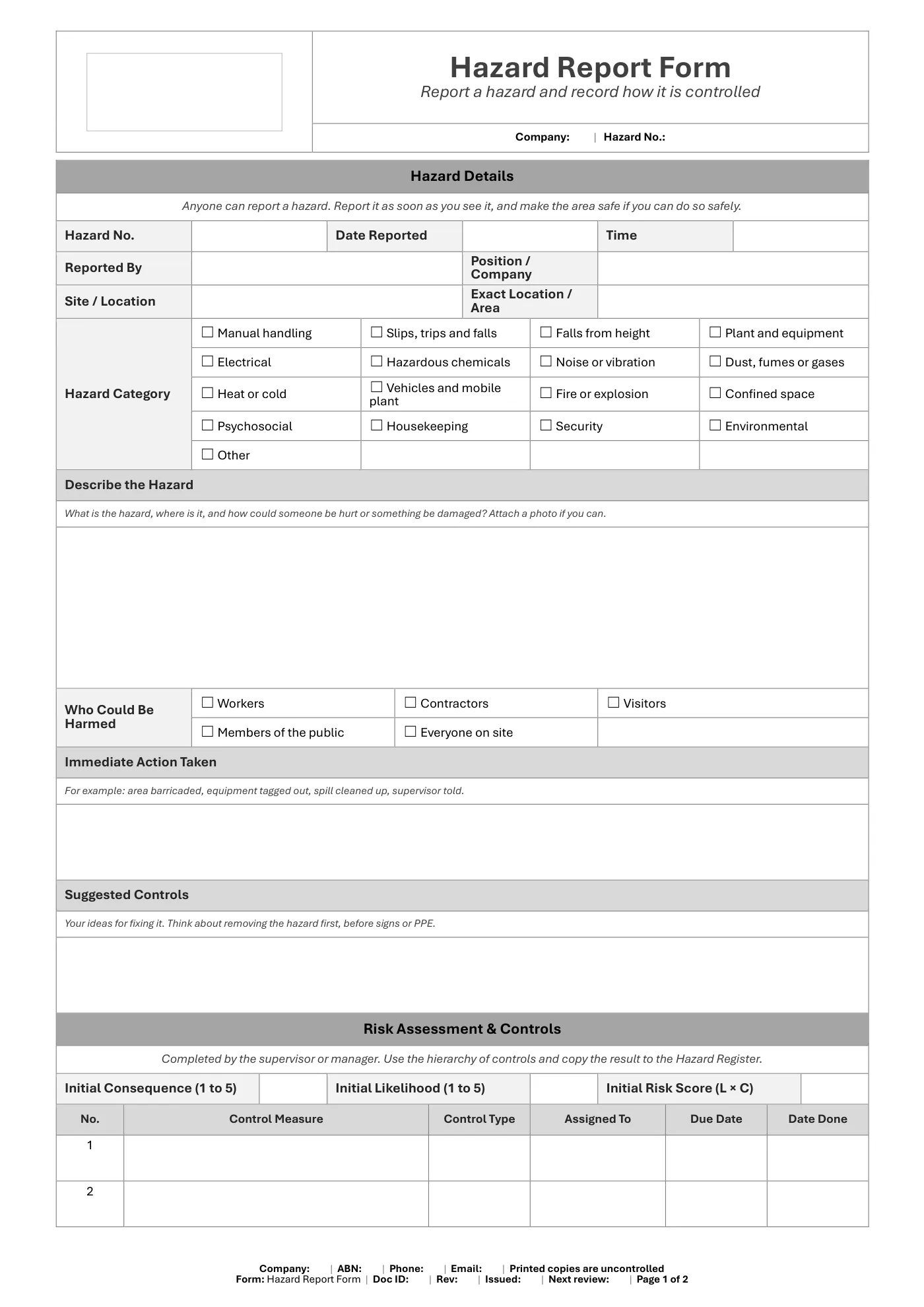
- Hazard details: number, date, reporter, location and hazard category
- A description of the hazard and who could be harmed
- The immediate action taken and the reporter’s suggested controls
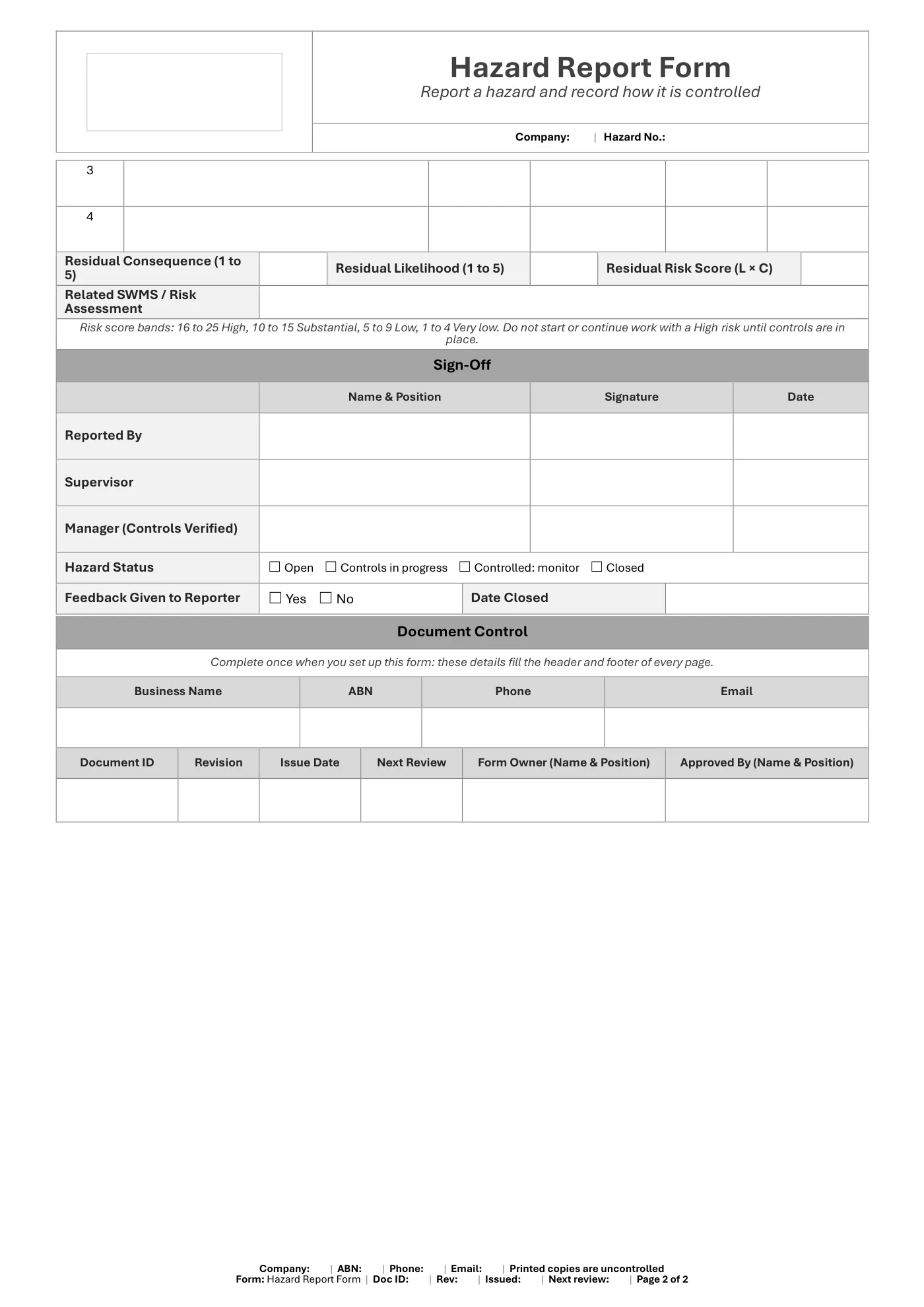
- Risk ratings before and after controls
- Control measures with the control type, owner and due date
- Sign-off by the reporter, supervisor and manager, and feedback to the reporter
What you get
- An editable Microsoft Word form (2 pages), A4 portrait, to fill in on screen or print
- Tick boxes and date pickers that work in Word
- Business details typed once and filled in on every page, plus a space for your logo
- The same fields as our free Hazard Register
Review it and adjust it to suit your business, your sites and the way your team works, and talk it through with your workers.
Hazard report form: frequently asked questions
What is a hazard report form?
A hazard report form is a short form a worker fills in to tell their supervisor about something that could cause harm, such as damaged equipment, a trip hazard or an unsafe work method. The supervisor then rates the risk, decides on controls and signs it off once the hazard is fixed.
What should a hazard report include?
Where and when the hazard was found, a description of the hazard, who could be harmed, what was done straight away, a suggested fix, the risk rating, the agreed controls with an owner and due date, and sign-off once it is closed out.
Is hazard reporting a legal requirement in Queensland?
The WHS Act does not name a hazard report form, but businesses must identify hazards and manage risks in consultation with workers, officers must make sure there are processes for receiving and responding to hazard information, and workers must co-operate with reasonable safety procedures. A hazard reporting form is the simplest way to meet these duties.
What is the difference between a hazard report and an incident report?
A hazard report is made before anyone is hurt, about something that could cause harm. An incident report is made after something has happened, such as an injury, illness or damage. A near miss report covers an event that could have caused harm but did not.
What happens after a hazard is reported?
The supervisor assesses the risk, chooses controls using the hierarchy of control, assigns actions with due dates and records the hazard in the hazard register. Once the controls are in place they sign the form off and tell the person who reported it what was done.
Is this hazard report form free?
Yes. Enter your first name and email address and the Word form downloads straight away, with no card needed. You will also get our emails about new templates and WHS updates, and you can unsubscribe at any time.
This is general information, not legal advice. Check the current law or talk to Workplace Health and Safety Queensland for your situation.
Having trouble with your download? Contact us any time. Please read our Disclaimer before downloading.
How to use it
From download to site in three steps
Fill in the form and download
Enter your name and email. Your download buttons appear straight away and the links are emailed to you.
Make it yours
Open it in Microsoft Word or Excel. Add your logo, business details, site and job information, and adjust it to how the work is done.
Brief your crew
Talk it through with the workers doing the job, have them sign on, and keep it on site. Review it whenever the job or conditions change.
What format is it?
Microsoft Word. Edit it in Word, or free in Word for the web, and add your own logo and business details.
How do I get it?
Fill in your name and email on this page. Your download buttons appear as soon as you send the form, and the links are emailed to you. You can download it again from your account at any time.
Is it compliant with Queensland law?
It's written around Queensland's Work Health and Safety Act 2011 and Regulation 2011. Tailor it to your site, consult your workers and review it whenever conditions change; no template can guarantee compliance on its own.
What if it isn't right for my job?
Check the sample pages first. If the template has a fault or doesn't match its description, tell us and we'll fix it. Every template is a starting point that you tailor to your own work.
Only logged in customers who have purchased this product may leave a review.
Reviews