
Free Incident Register Template
Free Excel incident register for Queensland workplaces: record every incident, injury and near miss, track notifications, claims and corrective actions, and see your totals at a glance.
RG
Written by Ryan Graham, health and safety professional (16 years on Queensland sites)
Free
No payment needed · instant download
- Instant download · it appears as soon as you send the form
- Make it yours in minutes · edit in Microsoft Excel and add your logo
- If it has a fault · tell us and we'll fix it
- No card needed · free to download, with no payment details asked for
About this template
A free Excel register for recording and following up every incident, injury, illness and near miss in your workplace. It captures what Queensland businesses need to keep: whether an incident was notifiable and when Workplace Health and Safety Queensland or the Electrical Safety Office was told, the WorkCover report and claim, the investigation and every corrective action through to close-out.
Use it with our Free Incident Report Form, Incident Management Policy & Procedure.
Incident register, incident log or accident register?
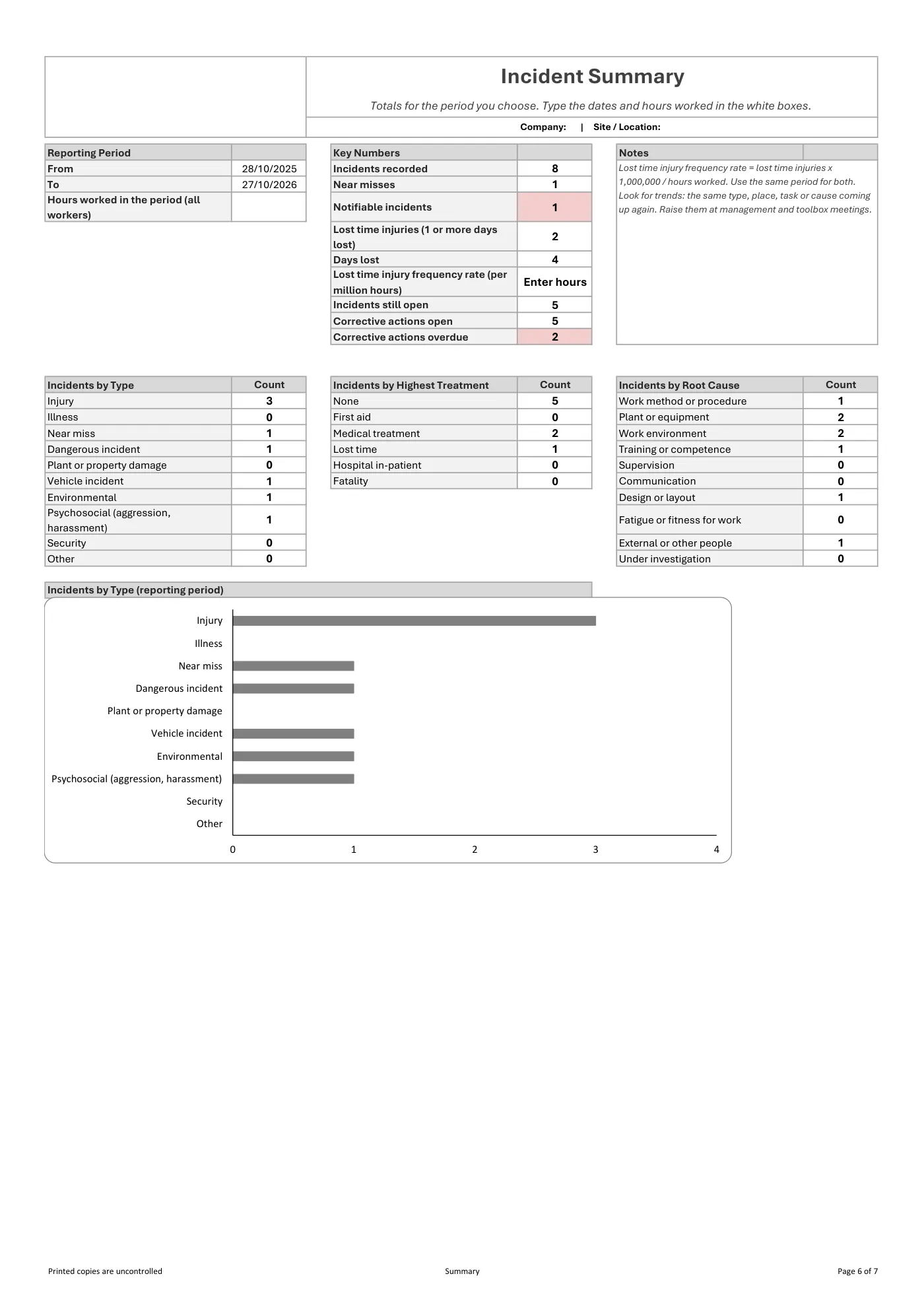
They are the same thing: one list of every incident, injury, illness and near miss, so nothing is missed and you can see patterns over time. This incident register template is an Excel workbook, so you can sort and filter it, and the Summary sheet counts incidents by type and works out your lost time injury frequency rate for any period.
What the law asks you to keep
A business must keep a record of each notifiable incident for at least 5 years from the day the regulator was notified (section 38 of the Work Health and Safety Act 2011 (Qld)). A notifiable incident is a death, a serious injury or illness, or a dangerous incident (sections 35 to 37). Keeping every incident and near miss in one register, not just the notifiable ones, makes it easier to show how you manage risks and to spot the hazards that keep coming up. Read more about notifiable incidents in Queensland.
How to use the incident register
- Type your business details once on the Start Here sheet.
- Record each incident using the details from the incident report form: the fields are in the same order.
- Mark whether it was notifiable and record when the regulator and your insurer were told.
- Rate the consequence and likelihood, record the root cause, and add the corrective actions on the linked sheet.
- Check the Summary sheet each month and follow up overdue actions, which are highlighted in red.
What is included in our free incident register?
- A Start Here sheet: type your business details once and they appear on every sheet
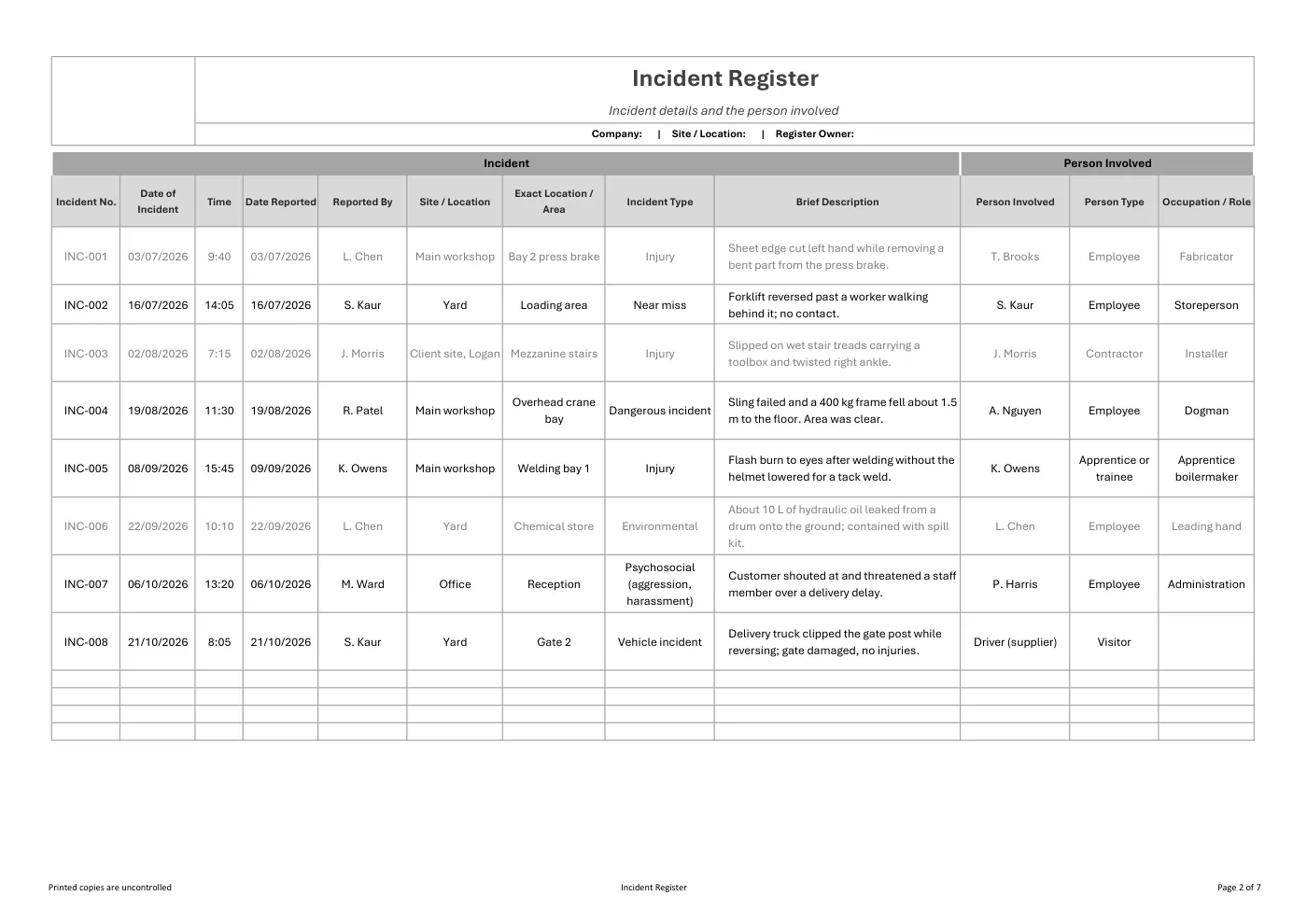
- The incident register: date, location, type, people involved, injury details, treatment and days lost
- Notification and claims: notifiable incident, regulator notified, reference number, insurer report and claim number
- Investigation: consequence and likelihood ratings with an automatic risk score, and the root cause
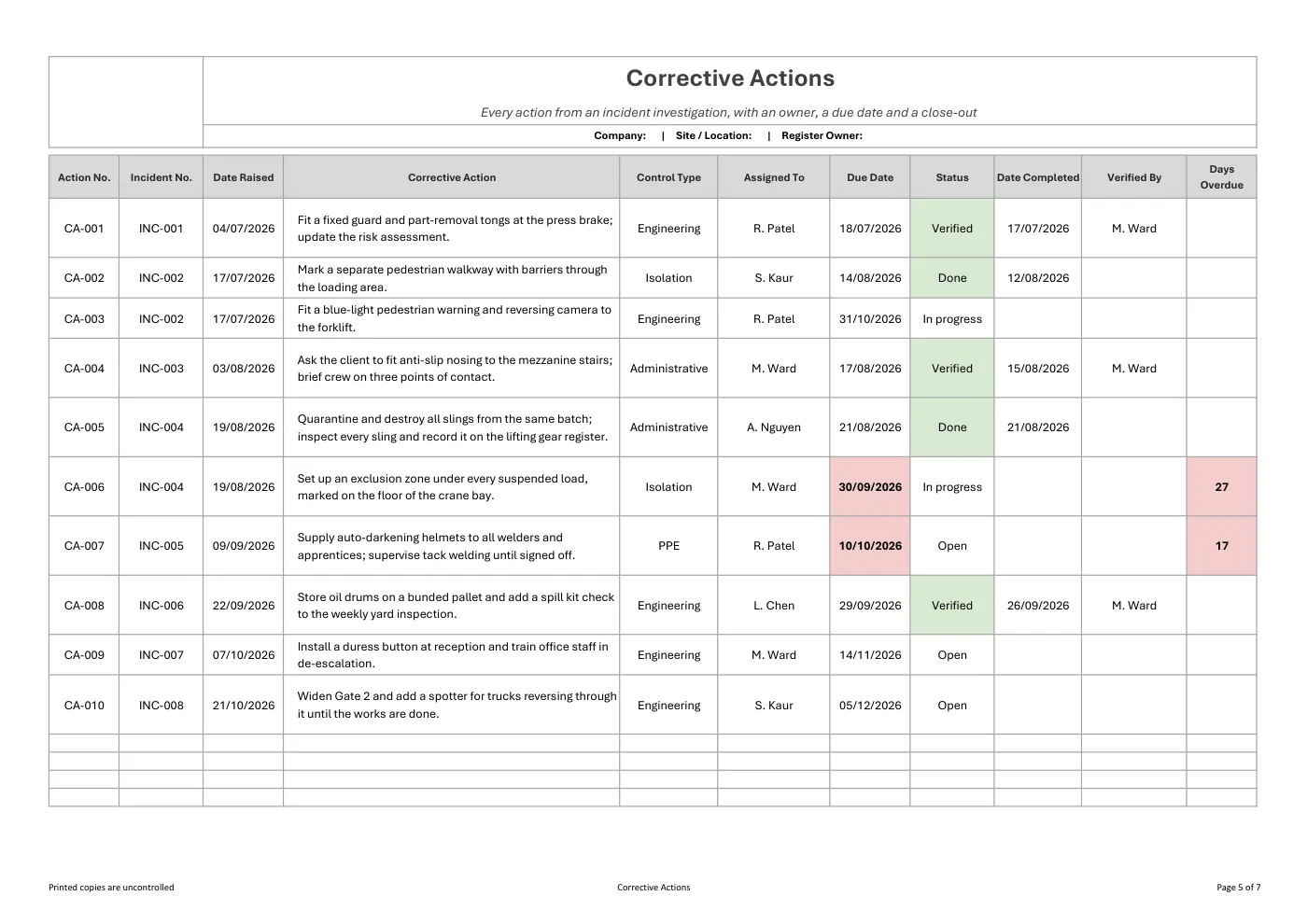
- A linked Corrective Actions sheet with owners, due dates and overdue actions highlighted in red
- A Summary sheet: totals for any period, lost time injury frequency rate and a chart by incident type
- Drop-down lists you can change to suit your business
- A plain-English summary of the Queensland notification and record-keeping rules
What you get
- An editable Microsoft Excel workbook with no macros
- Drop-down lists, frozen headings, automatic risk scores and colour highlighting
- Room for 150 incidents and 250 corrective actions, with more rows when you need them
- Print-ready pages: the header, incident number and date repeat on every printed page
- Fields that match our free Incident Report Form, so the form and the register line up
Review it and adjust it to suit your business, your sites and the way your team works, and talk it through with your workers.
Incident register template: frequently asked questions
What is an incident register?
An incident register, also called an incident log or accident register, is one list of every workplace incident, injury, illness and near miss, with the investigation and corrective actions for each. It helps you meet record-keeping duties and spot patterns.
Is an incident register required in Queensland?
The law requires a record of each notifiable incident to be kept for at least 5 years from the day the regulator was notified. A register of all incidents is not named in the law, but it is the usual way businesses keep those records and track corrective actions.
Is this incident register an Excel template?
Yes. It is an editable Microsoft Excel workbook with no macros, drop-down lists, automatic risk scores, a linked corrective actions sheet and a summary with a chart by incident type.
Does the incident register calculate LTIFR?
Yes. The Summary sheet shows the totals and the lost time injury frequency rate for the period you choose, along with a chart by incident type.
What is the difference between an incident report and an incident register?
An incident report records one incident in detail. The incident register lists all incidents in one place so you can track actions and trends. Use our free incident report form for each event and copy the key details into the register.
Is the incident register free?
Yes. Enter your first name and email address and the Excel file downloads straight away, with no card needed. You will also get our emails about new templates and WHS updates, and you can unsubscribe at any time.
This is general information, not legal advice. Check the current law or talk to Workplace Health and Safety Queensland for your situation.
Having trouble with your download? Contact us any time. Please read our Disclaimer before downloading.
How to use it
From download to site in three steps
Fill in the form and download
Enter your name and email. Your download buttons appear straight away and the links are emailed to you.
Make it yours
Open it in Microsoft Word or Excel. Add your logo, business details, site and job information, and adjust it to how the work is done.
Brief your crew
Talk it through with the workers doing the job, have them sign on, and keep it on site. Review it whenever the job or conditions change.
What format is it?
Microsoft Excel. Edit it in Excel, or free in Excel for the web, and add your own logo and business details.
How do I get it?
Fill in your name and email on this page. Your download buttons appear as soon as you send the form, and the links are emailed to you. You can download it again from your account at any time.
Is it compliant with Queensland law?
It's written around Queensland's Work Health and Safety Act 2011 and Regulation 2011. Tailor it to your site, consult your workers and review it whenever conditions change; no template can guarantee compliance on its own.
What if it isn't right for my job?
Check the sample pages first. If the template has a fault or doesn't match its description, tell us and we'll fix it. Every template is a starting point that you tailor to your own work.
Only logged in customers who have purchased this product may leave a review.
Reviews