
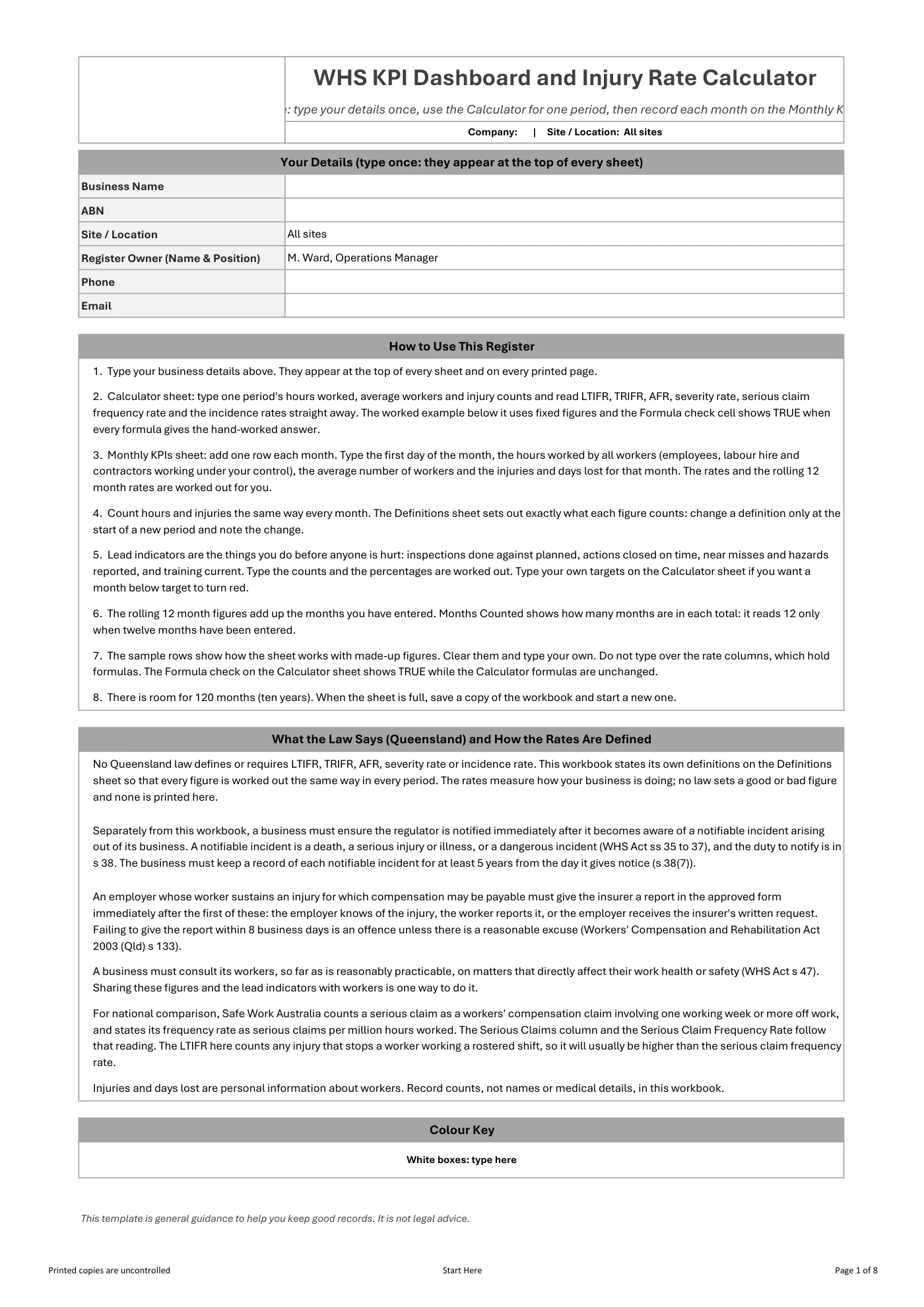
WHS KPI Dashboard and Injury Rate Calculator
Editable Excel LTIFR calculator and WHS KPI dashboard: LTIFR, TRIFR, AFR, severity and incidence rates per million hours, rolling 12 months, lead indicators and a worked example.
RG
Written by Ryan Graham, health and safety professional (16 years on Queensland sites)
$9.99 incl. GST
AUD · one-off purchase · instant download
- Instant download · your links arrive by email straight after checkout and work for 3 months, so save your copy
- Make it yours in minutes · edit in Microsoft Excel and add your logo
- Quality guarantee · we'll fix any problem, then refund you or give store credit if you're still not happy
- Secure checkout · card, Apple Pay or Google Pay through Stripe
Save with a bundle
About this template
An editable Excel workbook for the injury rates and safety measures most businesses report: LTIFR, TRIFR, AFR, severity rate and incidence rate, using the per-million-hours definitions set out on a Definitions sheet. Use the Calculator for one period, or record each month and let the sheet work out the month and rolling 12 month rates. A worked example with fixed figures and a TRUE or FALSE formula check shows the formulas calculate. Lead indicators track inspections, actions closed on time, near misses, hazard reports and training. No Queensland law defines these rates, so the workbook states its own definitions and uses them the same way every period.
What Is Included In Our WHS KPI Dashboard and Injury Rate Calculator?
- A Start Here sheet: type your details once and they appear on every sheet and printed page
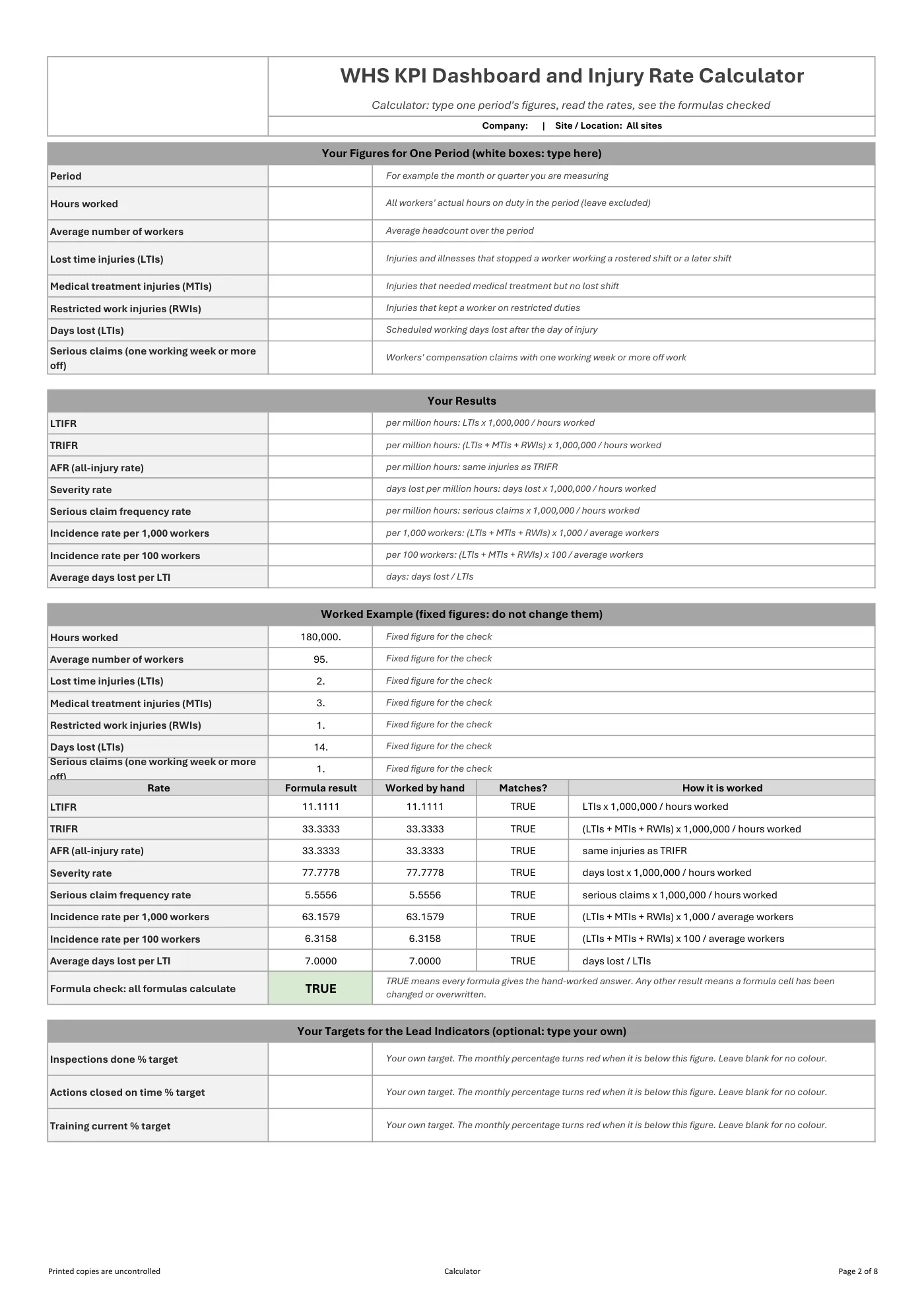
- A Calculator for one period: type hours worked, average workers, injuries and days lost and read the rates at once
- LTIFR, TRIFR, AFR, severity rate, serious claim frequency rate, incidence rate per 1,000 and per 100 workers and average days lost per LTI
- A worked example with fixed figures, the answer worked by hand and a Formula check that shows TRUE when every formula calculates
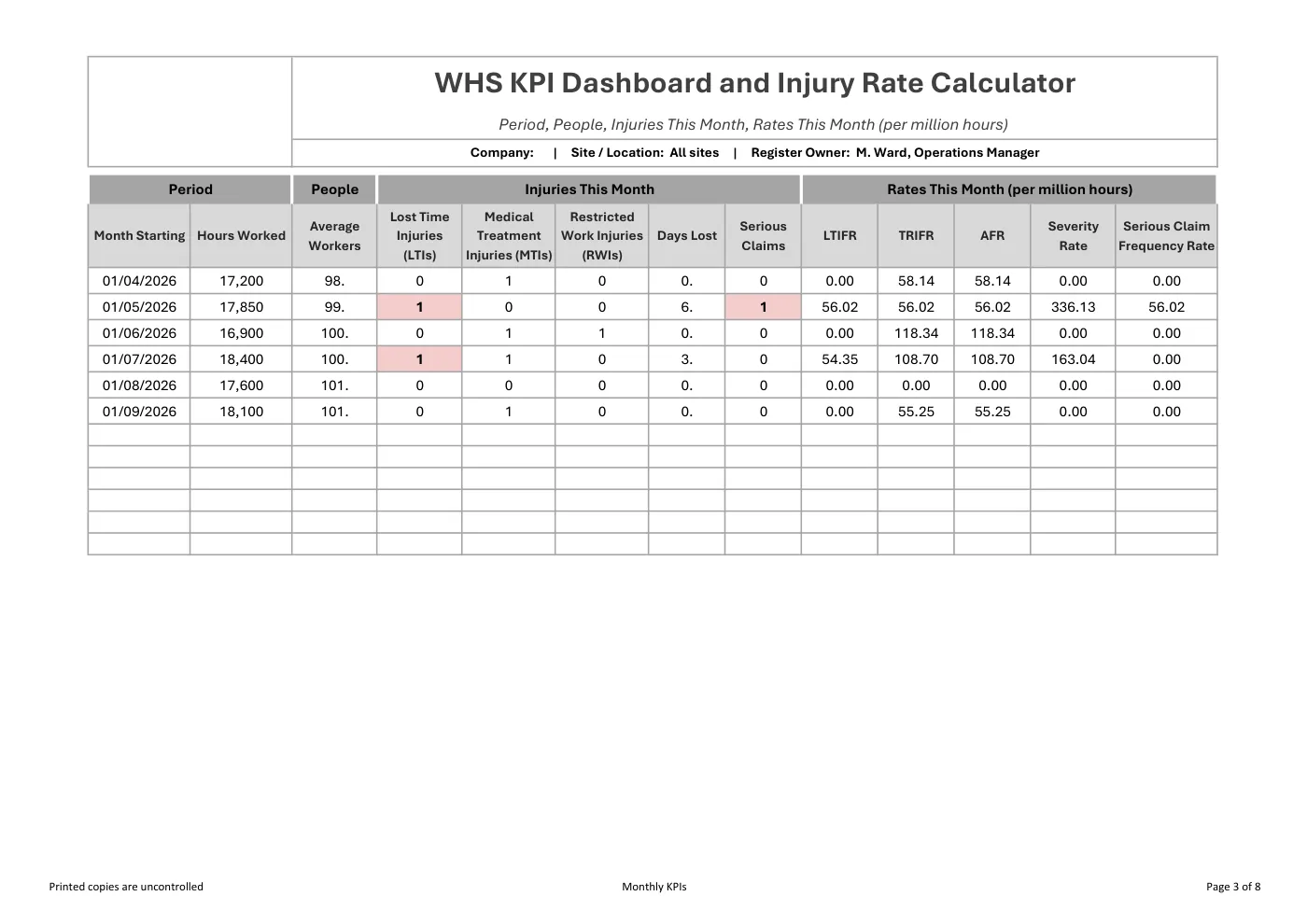
- A Monthly KPIs sheet with a row for each month and automatic month and rolling 12 month rates, with divide-by-zero guarded
- Lead indicators: inspections done against planned, actions closed on time, near misses and hazards reported, training current, with optional targets you type yourself
- A Definitions sheet that sets out exactly what hours worked, LTI, MTI, RWI, days lost and each rate count
- A plain-English summary of the Queensland rules on notifying incidents and reporting injuries to the insurer
Legislation and Codes of Practice Referenced
- Work Health and Safety Act 2011 (Qld): ss 35 to 38 (notifiable incidents and notification), s 47 (consultation)
- Workers’ Compensation and Rehabilitation Act 2003 (Qld): s 133 (employer’s duty to report an injury)
What You Get
- An editable Microsoft Excel workbook with no macros
- A Calculator, a worked example with a formula check, a monthly dashboard and a Definitions sheet
- Working formulas, lead indicators and colour highlighting of lost time injuries
- Room for 120 months (ten years) of records
- Print-ready pages with your business and site details repeated on every printed page
Review it and adjust it to suit your business, your sites and the way your team works, and talk it through with your workers. If you have any trouble downloading this template, you can contact us at any time. Please make sure you read our Disclaimer before downloading.
Having trouble with your download? Contact us any time. Please read our Disclaimer before downloading.
How to use it
From download to site in three steps
Buy and download
Check out with card, Apple Pay or Google Pay. Your download buttons appear straight away and the links are emailed to you. Links work for 3 months, so save your copies.
Make it yours
Open it in Microsoft Word or Excel. Add your logo, business details, site and job information, and adjust it to how the work is done.
Brief your crew
Talk it through with the workers doing the job, have them sign on, and keep it on site. Review it whenever the job or conditions change.
What format is it?
Microsoft Excel. Edit it in Excel, or free in Excel for the web, and add your own logo and business details.
How do I get it after I pay?
Your download buttons appear as soon as checkout finishes, and the links are emailed to you. You can re-download from your account at any time.
Is it compliant with Queensland law?
It's written around Queensland's Work Health and Safety Act 2011 and Regulation 2011. Tailor it to your site, consult your workers and review it whenever conditions change; no template can guarantee compliance on its own.
What if it isn't right for my job?
If it doesn't match its description or has a fault, tell us and we'll fix it. If you're still not happy, we'll refund you or give you store credit, your choice. Check the sample pages first, as we don't refund a change of mind.
Only logged in customers who have purchased this product may leave a review.
More templates like this
WHS Legal Register
$9.99
Reviews